Dify Latest Updates 2026
Current Version: Check the official Dify GitHub Releases for the latest release notes. Dify publishes frequent updates with new features, performance improvements, and bug fixes.
Dify 2026 Release Notes & Changelog Highlights
The Dify platform has evolved significantly in 2026. Here are the major updates organized by category:
Platform & Core Engine
- Enhanced Workflow Orchestration: New conditional branching with complex logic operators (AND/OR/NOT), loop processing with parallel execution, and comprehensive error handling with retry policies for complex AI pipelines
- Workflow Version Control: Track changes, compare versions, and rollback to previous workflow configurations
- Batch Processing: Run workflows against multiple inputs simultaneously with progress tracking and exportable results
- Sub-workflow Support: Create reusable workflow modules that can be called from multiple parent workflows
Model Provider Updates
- Expanded LLM Integration: Added support for the latest models including GPT-5.4, Claude Opus 4.6, Qwen 3.5, GLM-5, and Kimi K2.5
- Model Routing: Automatically route requests to the best model based on task type, cost constraints, and performance requirements
- Fallback Configuration: Set backup models that activate when the primary model is unavailable or rate-limited
- Cost Tracking: Monitor token usage and spending per model provider with budget alerts
RAG & Knowledge Base
- Improved Document Processing: Automatic format detection, table extraction from PDFs, and multi-column layout handling
- Smarter Chunking Strategies: New semantic chunking that respects document structure (headings, paragraphs, lists) instead of fixed-size splits
- Hybrid Search: Combine dense vector search with keyword BM25 search for more accurate retrieval
- Configurable Retrieval Thresholds: Set minimum similarity scores and top-K parameters per knowledge base
- Multi-Knowledge Base Queries: Search across multiple knowledge bases in a single query with weighted results
Agent Framework
- Advanced Tool Calling: Support for parallel tool execution, tool chaining, and conditional tool selection based on context
- Multi-Step Reasoning: Agents can break down complex tasks into sub-tasks, execute them sequentially, and aggregate results
- Autonomous Task Execution: Set up agents that run on schedules, respond to webhooks, or trigger based on external events
- Human-in-the-Loop: Pause agent execution for human approval before sensitive actions (API calls, data modifications)
Enterprise & Security
- SSO Integration: Support for SAML 2.0, OIDC, and OAuth 2.0 enterprise single sign-on
- Role-Based Access Control: Granular permissions for workspace admins, developers, reviewers, and viewers
- Audit Logging: Track all user actions, API calls, and model requests with timestamps and IP addresses
- Data Residency: Choose where your data is stored and processed to comply with regional regulations (GDPR, etc.)
- API Rate Limiting: Configure per-user and per-workspace rate limits to prevent abuse
Deployment & Infrastructure
- Simplified Docker Compose: One-command deployment with pre-configured PostgreSQL, Redis, and optional vector database
- Kubernetes Helm Charts: Production-ready Helm charts with auto-scaling, health checks, and rolling updates
- Managed Cloud Hosting: Dify Cloud with free tier (200 messages/month), Pro ($59/month), and Team ($199/month) plans
- Horizontal Scaling: Deploy multiple API workers behind a load balancer for high-traffic applications
For the complete changelog and all release notes, visit the Dify GitHub Releases page.
Core Features
1. Visual Workflow Orchestration
Dify’s core advantage lies in its visual workflow editor. You can connect different AI components like building blocks to construct complex application logic:
- LLM Node: Connect to various large language models (GPT-4, Claude, Qwen, etc.)
- Knowledge Base Node: Implement RAG functionality, enabling AI to answer based on your private data
- Tool Node: Integrate external APIs, databases, search services
- Conditional Branches: Dynamically select execution paths based on input
- Loop Processing: Batch process multiple data items
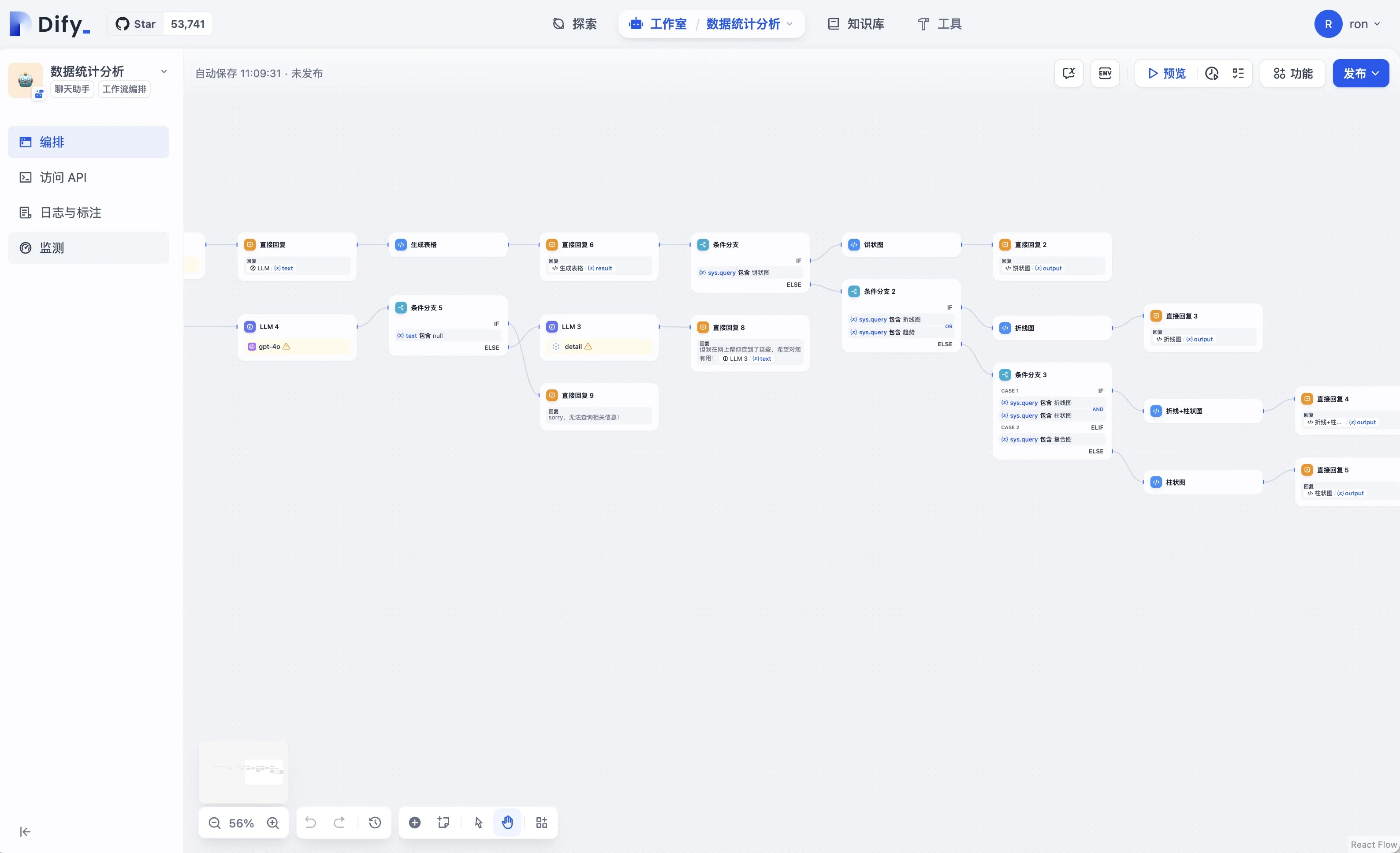 Dify’s visual workflow builder showing LLM nodes, Answer nodes, and Knowledge Retrieval (source: Wonderhows)
Dify supports integration with almost all mainstream LLM providers:
Supported Model Providers:
- OpenAI (GPT-4, GPT-4o, GPT-5.4)
- Anthropic (Claude 3.5, Claude Opus 4.6)
- Google (Gemini 2.0)
- Alibaba Cloud (Qwen 3.5, Qwen-Max)
- Zhipu AI (GLM-5)
- Moonshot (Kimi K2.5)
- Local Deployment (Ollama, LM Studio)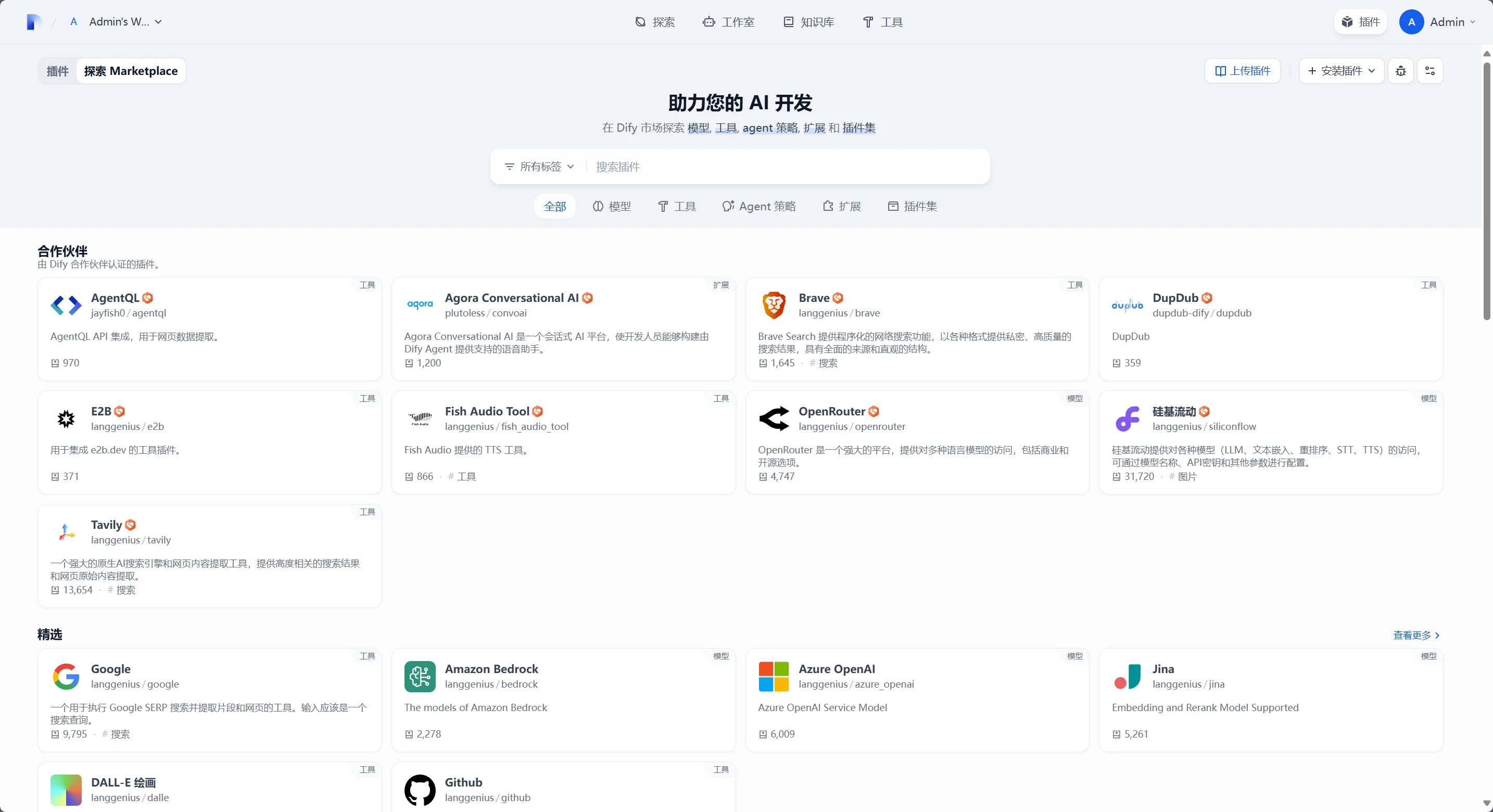 Dify’s model providers page with 50+ supported LLM integrations (source: Dify)
3. Knowledge Base and RAG
Upload your documents (PDF, Word, Markdown, etc.), and Dify will automatically perform vectorization, enabling AI to answer questions based on your private data:
- Supports multiple document formats
- Automatic text chunking and vectorization
- Multiple vector database options (Milvus, Weaviate, pgvector)
- Configurable retrieval strategies and similarity thresholds
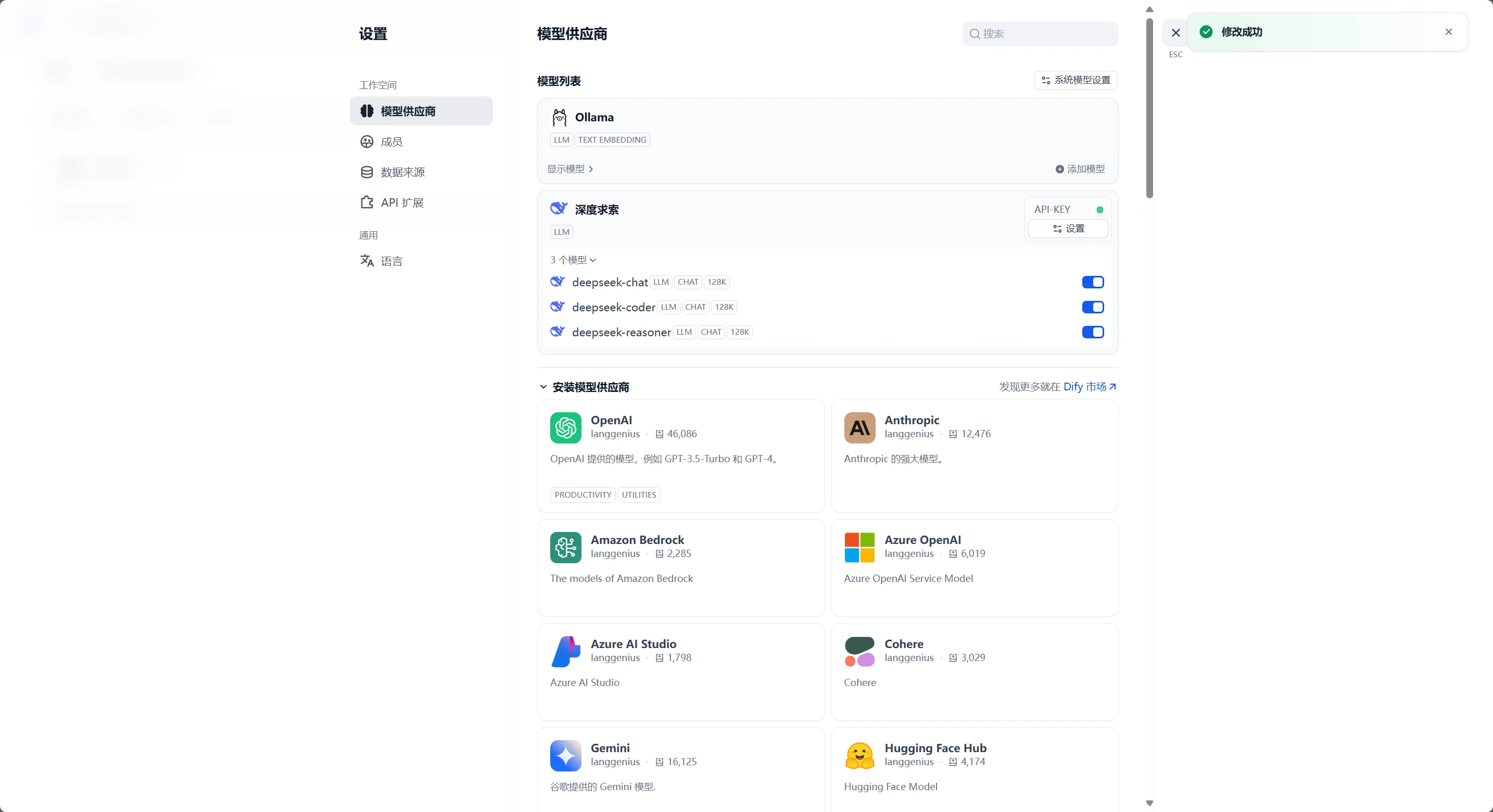 Dify’s knowledge base page showing document datasets with status and item counts (source: Dify)
Dify Features Overview 2026
Complete Feature List
Here’s a comprehensive breakdown of all Dify platform features as of 2026:
Application Types
| Type | Description | Best For |
|---|---|---|
| Chatbot | Conversational AI with memory and context | Customer support, Q&A |
| Text Generator | Prompt-based content generation | Marketing, documentation |
| Agent | Autonomous AI with tool access | Research, data analysis |
| Workflow | Visual multi-step AI pipelines | Complex business logic |
| Completion App | One-shot text completion | Translation, summarization |
Workflow Components
- Start Node: Define input variables (text, numbers, files, select options)
- LLM Node: Call any supported model with custom prompts and parameters
- Knowledge Retrieval: Search your knowledge base with configurable strategies
- Tool Node: Execute API calls, code, database queries, or web searches
- Code Node: Run Python or JavaScript for data transformation
- Template Transformation: Apply Jinja2 templates to format outputs
- Question Classifier: Route inputs to different paths based on AI classification
- HTTP Request: Make REST API calls with custom headers, methods, and body
- Variable Aggregator: Combine multiple variables into a single output
- Conditional Branch: Route execution based on conditions (AND/OR/NOT logic)
- Loop: Iterate over arrays with configurable parallelism
- Iteration: Process list items one by one with access to previous results
- End Node: Define the final output structure
Supported Model Providers (50+)
OpenAI: GPT-4o, GPT-4, GPT-3.5 Turbo, DALL-E, Whisper Anthropic: Claude 4 Opus, Claude 4 Sonnet, Claude 3.5 Sonnet Google: Gemini 2.5 Pro, Gemini 2.0 Flash, Gemini 1.5 Pro Alibaba: Qwen 3.5, Qwen-Max, Qwen-Plus, Qwen-Turbo Zhipu AI: GLM-5, GLM-4-Plus, GLM-4-Flash Moonshot: Kimi K2.5, Kimi K2 Meta: Llama 3.3 70B, Llama 3.1 405B Mistral: Mistral Large, Mixtral 8x22B Local: Ollama, LM Studio, vLLM, LocalAI And 40+ more: Azure OpenAI, AWS Bedrock, Cohere, Replicate, Together AI, and more
Knowledge Base Features
- Document Types: PDF, Word (.docx), PowerPoint, Excel, Markdown, TXT, HTML, CSV
- Web Crawling: Automatically scrape and index websites
- Notion Integration: Import pages directly from Notion workspaces
- Chunking Modes: Automatic, Custom (token-based), Semantic (AI-based), Parent-Child
- Embedding Models: OpenAI, Cohere, Qwen, local models via Ollama
- Vector Databases: Weaviate, Qdrant, Milvus, pgvector, Chroma, Tencent Vector DB
- Retrieval Strategies: Keyword, Semantic, Hybrid (BM25 + Vector)
- Reranking: Optional reranking step for higher precision results
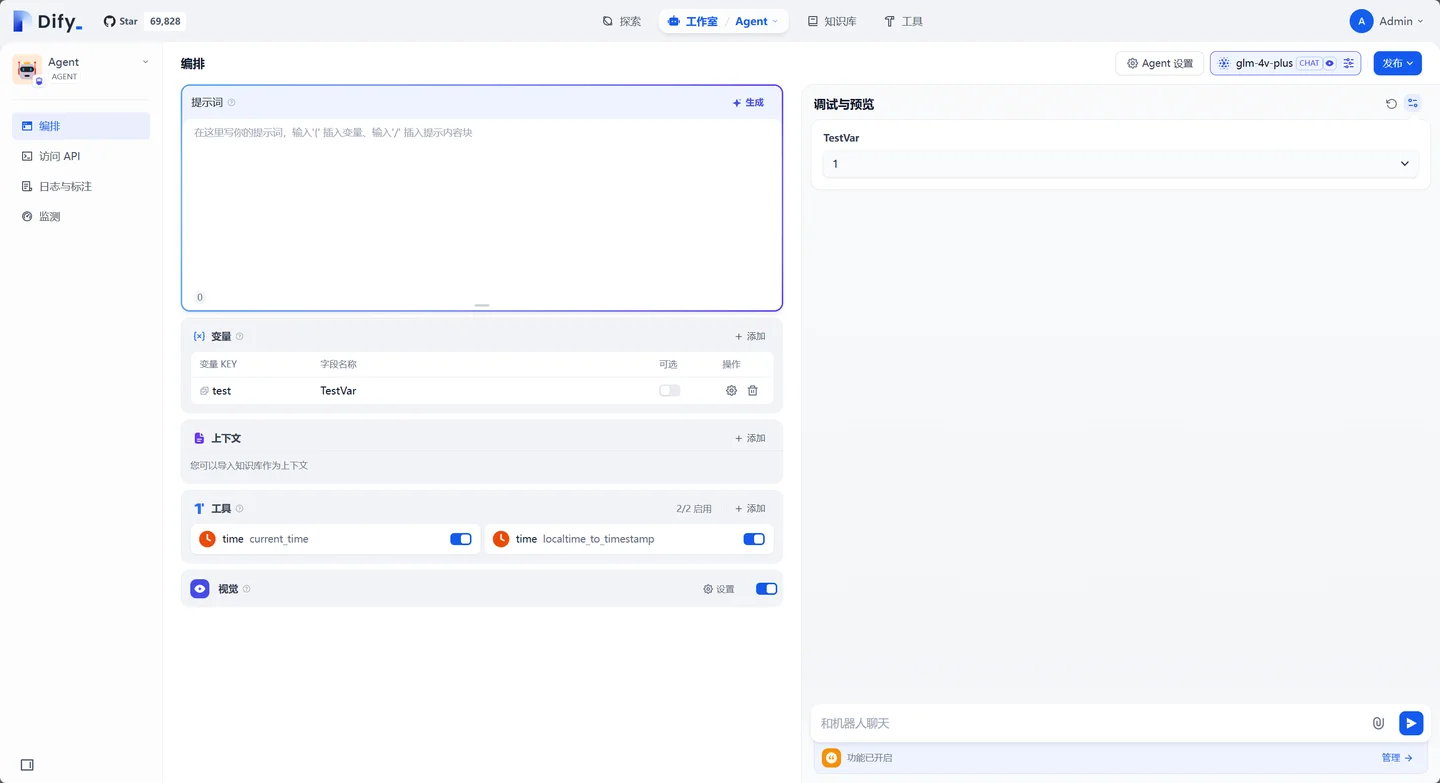 Dify dataset detail page with chunking configuration and segment management (source: Dify)
Enterprise Features
- SSO: SAML 2.0, OIDC, OAuth 2.0
- LDAP/AD: Active Directory integration
- RBAC: Workspace Owner, Admin, Editor, Developer, Viewer roles
- Audit Logs: Full action history with export capability
- API Keys: Per-workspace and per-user API key management
- Webhooks: Trigger external systems on workflow events
- Data Export: Export conversations, workflow configs, and knowledge base contents
Dify vs Alternatives 2026
Dify vs LangChain
| Feature | Dify | LangChain |
|---|---|---|
| Interface | Visual drag-and-drop UI | Code-first (Python/JS) |
| Learning Curve | Low (hours) | High (weeks) |
| Built-in RAG | Yes, with UI | Requires setup |
| Deployment | One-click | Manual |
| Team Collaboration | Built-in | Not natively |
| Best For | Non-technical users, rapid prototyping | Developers, custom integrations |
Dify vs Coze
| Feature | Dify | Coze |
|---|---|---|
| Open Source | ✅ Apache 2.0 | ❌ Proprietary |
| Self-Hosted | ✅ Full control | ❌ Cloud only |
| Model Choice | ✅ 50+ providers | ❌ Limited selection |
| Data Privacy | ✅ Your infrastructure | ❌ ByteDance servers |
| Customization | ✅ Full code access | ❌ Limited |
Dify vs Flowise
| Feature | Dify | Flowise |
|---|---|---|
| RAG | ✅ Advanced with reranking | ✅ Basic |
| Agents | ✅ Multi-step reasoning | ✅ Tool use |
| Enterprise | ✅ SSO, RBAC, audit logs | ❌ Limited |
| Community | ✅ 20k+ GitHub stars | ✅ 15k+ stars |
| Cloud Hosting | ✅ Managed service | ❌ Self-host only |
Quick Start
System Requirements
Before installing Dify, ensure your system meets these requirements:
Minimum (Development/Testing):
- CPU: 2 cores
- RAM: 4 GB
- Disk: 20 GB
- OS: Linux (Ubuntu 20.04+), macOS 12+, Windows 10+ (WSL2)
Recommended (Production):
- CPU: 4+ cores
- RAM: 8+ GB
- Disk: 50+ GB SSD
- OS: Linux (Ubuntu 22.04 LTS recommended)
- Docker 20.10+ and Docker Compose v2+
Self-Hosted Installation Guide 2026
Option 1: Docker Compose (Recommended)
The fastest way to get Dify running locally:
# 1. Clone the repository
git clone https://github.com/langgenius/dify.git
cd dify/docker

# 2. Copy the environment template
cp .env.example .env

# 3. Edit .env to configure:
#    - SECRET_KEY (generate with: openssl rand -hex 16)
#    - Database password
#    - Model provider API keys (optional)

# 4. Start all services
docker compose up -d

# 5. Verify all containers are running
docker compose ps

# 6. Access the web interface
# Open http://localhost in your browser
What gets installed:
dify-web: Frontend UI (Nginx + React)dify-api: Backend API (Python/FastAPI)dify-worker: Async task processordify-sandbox: Code execution sandboxpostgres: Primary databaseredis: Cache and message queueweaviate: Vector database (for RAG)
Option 2: Production Docker Compose
For production deployments with persistent configuration:
# docker-compose.prod.yml
version: '3.8'
services:
  api:
    image: langgenius/dify-api:latest
    restart: always
    environment:
      - SECRET_KEY=${SECRET_KEY}
      - LOG_LEVEL=WARNING
      - DB_HOST=postgres
      - DB_PORT=5432
      - DB_USERNAME=dify
      - DB_PASSWORD=${DB_PASSWORD}
      - DB_DATABASE=dify
      - REDIS_HOST=redis
      - REDIS_PORT=6379
      - REDIS_PASSWORD=${REDIS_PASSWORD}
    ports:
      - "5001:5001"
    depends_on:
      - postgres
      - redis
    volumes:
      - app_data:/app/storage

  web:
    image: langgenius/dify-web:latest
    restart: always
    ports:
      - "3000:3000"
    depends_on:
      - api

  postgres:
    image: postgres:15-alpine
    restart: always
    environment:
      - POSTGRES_USER=dify
      - POSTGRES_PASSWORD=${DB_PASSWORD}
      - POSTGRES_DB=dify
    volumes:
      - pgdata:/var/lib/postgresql/data
    healthcheck:
      test: ["CMD", "pg_isready", "-U", "dify"]
      interval: 10s
      timeout: 5s
      retries: 5

  redis:
    image: redis:7-alpine
    restart: always
    command: redis-server --requirepass ${REDIS_PASSWORD}
    volumes:
      - redis_data:/data

volumes:
  pgdata:
  redis_data:
  app_data:
# Deploy
docker compose -f docker-compose.prod.yml up -d
# Check logs
docker compose -f docker-compose.prod.yml logs -f apiOption 3: Kubernetes Deployment
For enterprise-scale deployments:
# Add the Dify Helm repository
helm repo add dify https://langgenius.github.io/dify-helm
helm repo update

# Install with custom values
helm install dify dify/dify \
  --namespace dify \
  --create-namespace \
  --values values.yaml
Option 4: Dify Cloud (No Installation)
Dify Cloud: https://cloud.dify.ai
- Free tier: 200 messages/month
- Pro: $59/month (10,000 messages)
- Team: $199/month (unlimited)
- No setup required, instant access
Initial Setup
After installation, complete these steps:
1. Open http://localhost in your browser
2. Create admin account (email + password)
3. Navigate to Settings > Model Providers
4. Configure at least one LLM provider:
   - OpenAI: Enter your API key
   - Or any other supported provider
5. Test the connection
6. Create your first application
Post-Installation Checklist
- Set a strong
SECRET_KEYin.env - Configure HTTPS with reverse proxy (Nginx/Traefik)
- Set up automated backups for PostgreSQL
- Configure firewall rules (only expose ports 80/443)
- Set up monitoring (health check endpoint:
/health) - Configure log rotation
- Update
.envwith your model provider API keys
Building Your First AI Application
Step 1: Create Application
1. Click "Create App" in dashboard
2. Choose template:
   - Chatbot
   - Text Generator
   - Agent
   - Workflow
3. Name your app
4. Click "Create"
Step 2: Configure Model
1. Go to "Model" tab
2. Select provider (e.g., OpenAI)
3. Enter API key
4. Choose model (e.g., GPT-4o)
5. Set parameters:
   - Temperature: 0.7
   - Max tokens: 2048
   - Top P: 0.9
Step 3: Design Prompt
System Prompt:
You are a helpful customer service assistant.
Answer questions politely and accurately.

User Input:
{{query}}

Instructions:
- Keep answers concise
- Use bullet points for lists
- Ask clarifying questions if needed
Step 4: Add Knowledge Base (Optional)
1. Go to "Knowledge" tab
2. Click "Create Knowledge Base"
3. Upload documents:
   - PDF files
   - Word documents
   - Markdown files
   - Text files
4. Configure chunking:
   - Chunk size: 500 tokens
   - Overlap: 50 tokens
5. Click "Process"
Step 5: Test and Deploy
1. Click "Preview" to test
2. Enter test queries
3. Review responses
4. Adjust prompt if needed
5. Click "Publish"
6. Get API endpoint or embed code
Advanced Features
Workflow Builder
Create complex multi-step workflows:
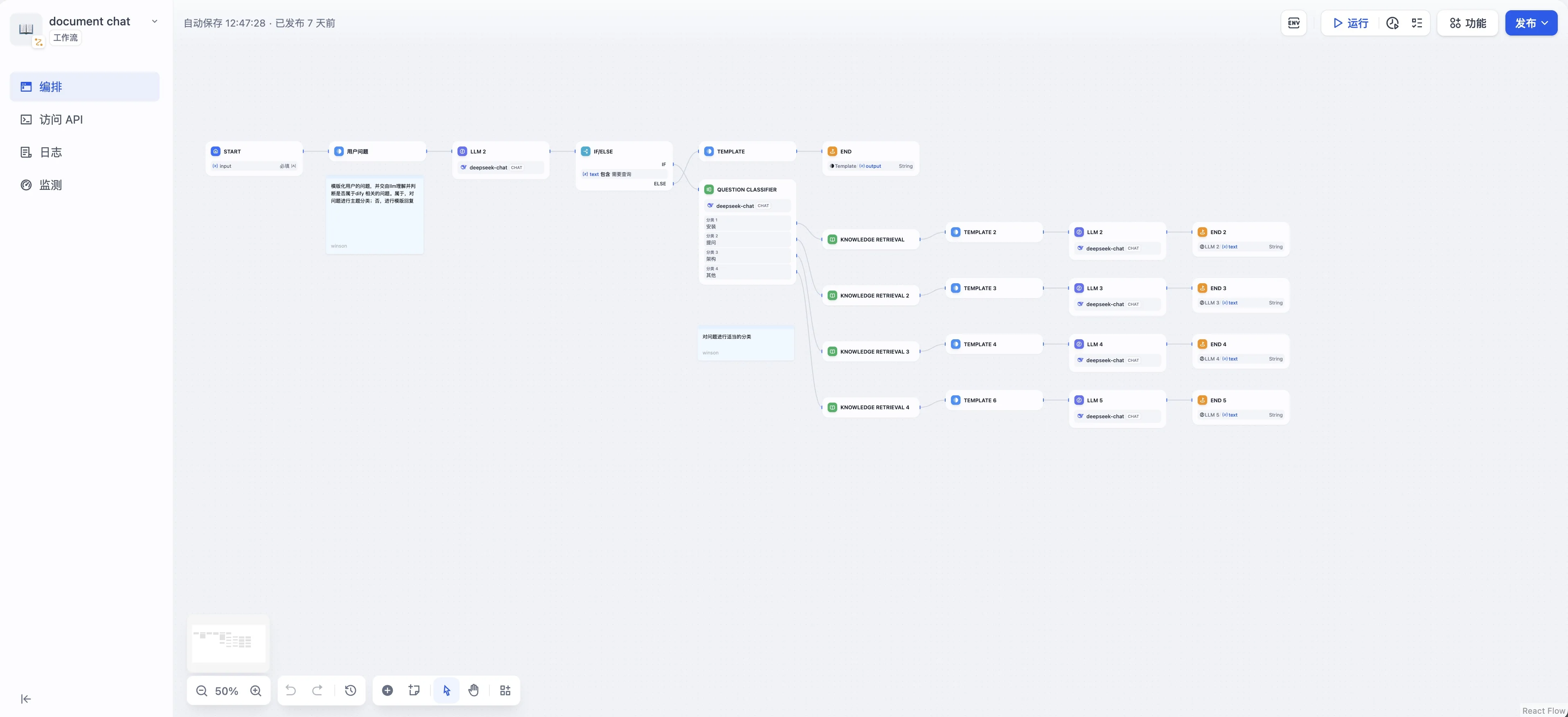 Dify workflow with conditional routing and multi-path logic (source: GitHub VariousBuilder)
Example Workflow: Customer Support Bot

1. Input Node
   - User query

2. Classification Node
   - If "technical" → Route to technical team
   - If "billing" → Route to billing team
   - If "general" → Continue

3. Knowledge Retrieval
   - Search knowledge base
   - Get relevant documents

4. LLM Generation
   - Generate response using retrieved context

5. Human Handoff (if needed)
   - Create support ticket
   - Send email notification

6. Output Node
   - Return response to user
Agent Configuration
Build autonomous AI agents:
Agent Capabilities:
  - Web Search
  - Code Execution
  - API Calls
  - Database Queries
  - File Operations

Example: Research Agent
1. Search web for topic
2. Extract key information
3. Summarize findings
4. Generate report
5. Save to file
API Integration
Connect external services:
API Tool Configuration:
  - Name: Weather API
  - Method: GET
  - URL: https://api.weather.com/v1/current
  - Parameters:
    - location: {{city}}
    - unit: metric
  - Authentication: Bearer Token
Use Cases
1. Customer Service Chatbot
Features:
- 24/7 automated support
- Knowledge base integration
- Human handoff capability
- Multi-language support

Setup Time: 30 minutes
2. Content Generation Tool
Features:
- Blog post generator
- Social media content
- Email templates
- SEO optimization

Setup Time: 20 minutes
3. Internal Knowledge Assistant
Features:
- Company documentation search
- HR policy Q&A
- IT support automation
- Onboarding assistant

Setup Time: 1 hour
4. Data Analysis Agent
Features:
- Upload CSV/Excel files
- Natural language queries
- Generate charts
- Export results

Setup Time: 45 minutes
Best Practices
1. Prompt Design
✅ Good:
"You are an expert Python developer. Write clean,
well-documented code following PEP 8 standards.
Include type hints and docstrings."

❌ Bad:
"Write Python code"
2. Knowledge Base Optimization
- Use clear, well-structured documents
- Remove irrelevant information
- Update regularly
- Monitor retrieval quality
3. Workflow Testing
- Test each node individually
- Test edge cases
- Monitor performance
- Log errors for debugging
4. Security
- Use environment variables for API keys
- Enable authentication for APIs
- Implement rate limiting
- Review access logs regularly
Pricing & Plans 2026
Self-Hosted (Free & Open Source)
Dify is fully open source under the Apache 2.0 license — you can self-host it on your own infrastructure with zero licensing costs.
What you get:
- ✅ Full access to all features (workflow builder, RAG, agents, API)
- ✅ No usage limits (limited only by your hardware)
- ✅ Complete data ownership and privacy
- ✅ Community support via GitHub and Discord
- ✅ 50+ model provider integrations
Hardware Requirements:
- Minimum: 2 CPU cores, 4GB RAM, 20GB disk
- Recommended: 4 CPU cores, 8GB RAM, 50GB SSD
- Production: 8+ CPU cores, 16GB RAM, separate database server
Infrastructure Costs (estimate):
- AWS EC2 t3.medium: ~$30/month
- DigitalOcean 4GB Droplet: ~$24/month
- VPS (Hetzner): ~$5/month
Dify Cloud Free Tier 2026
The free tier is designed for experimentation and light usage:
- ✅ 200 messages/month across all applications
- ✅ 1 knowledge base (up to 50 documents)
- ✅ Basic workflow builder with standard nodes
- ✅ Community support via Discord and GitHub
- ✅ 5 team members (workspace collaboration)
- ❌ No custom domain
- ❌ No SSO/SAML
- ❌ No audit logs
- ❌ No priority support
Best for: Students, hobbyists, proof-of-concept projects
Dify Cloud Pro — $59/month (billed annually)
- ✅ 10,000 messages/month
- ✅ 10 knowledge bases (up to 500 documents each)
- ✅ Advanced workflow nodes (code, HTTP request, iteration)
- ✅ Priority email support (24h response time)
- ✅ 25 team members
- ✅ Custom branding (remove Dify branding)
- ✅ API access with rate limits
- ✅ Export data (conversations, knowledge base)
- ❌ No SSO/SAML
- ❌ No audit logs
Best for: Small teams, startups, production applications
Dify Cloud Team — $199/month (billed annually)
- ✅ Unlimited messages
- ✅ Unlimited knowledge bases and documents
- ✅ All workflow nodes and features
- ✅ SSO/SAML/LDAP integration
- ✅ Role-based access control (RBAC)
- ✅ Audit logs with export
- ✅ Unlimited team members
- ✅ Custom domain support
- ✅ SLA support (4h response time, 99.9% uptime)
- ✅ Webhook integrations
Best for: Enterprise teams, compliance requirements
Dify Cloud Enterprise — Custom Pricing
For organizations with specific needs:
- Dedicated infrastructure
- Custom model integrations
- On-premise deployment assistance
- Dedicated account manager
- Custom SLA
- Training and onboarding
Contact sales@dify.ai for pricing.
Troubleshooting
Issue 1: Model Connection Fails
Symptoms: “Model provider not available” or “API key invalid” errors.
Solution:
- Verify your API key is correct and has sufficient credits
- Check network connectivity to the model provider’s API endpoint
- Review the Dify API logs:
docker compose logs -f api - Try a different model provider to isolate the issue
- Check if the provider is experiencing downtime (status page)
Issue 2: Slow Response Times
Symptoms: Responses taking 30+ seconds or timing out.
Solution:
- Use smaller/faster models for simple tasks (e.g., GPT-3.5 instead of GPT-4)
- Optimize knowledge base chunking (smaller chunks = faster retrieval)
- Enable response caching in workflow settings
- Scale infrastructure: increase API worker replicas
- Check database performance:
docker compose exec postgres pg_stat_statements
Issue 3: Poor RAG Quality
Symptoms: AI returns irrelevant or incorrect information from knowledge base.
Solution:
- Improve document quality — remove noisy or irrelevant content
- Adjust chunk size: try 500-1000 tokens with 10-15% overlap
- Switch to Hybrid Search (BM25 + Vector) for better keyword matching
- Enable reranking if your embedding model supports it
- Increase the top-K retrieval count (default: 3, try 5-8)
- Add more relevant documents to fill knowledge gaps
Issue 4: Docker Compose Fails to Start
Symptoms: docker compose up exits with errors.
Solution:
- Check Docker version:
docker --version(need 20.10+) - Check Docker Compose version:
docker compose version(need v2+) - Ensure ports 80, 5432, 6379 are not in use by other services
- Check disk space:
df -h(need at least 10GB free) - View detailed logs:
docker compose logs
Issue 5: Workflow Execution Errors
Symptoms: Workflow stops at a specific node with an error.
Solution:
- Check the node’s configuration (input variables, model selection)
- Verify API keys for any external service nodes
- Test each node individually using the “Run” button
- Check variable mappings between connected nodes
- Review the execution log for the specific error message
Resources
Official Resources
- Website: https://dify.ai
- GitHub: https://github.com/langgenius/dify (20k+ stars)
- Documentation: https://docs.dify.ai
- Release Notes: https://github.com/langgenius/dify/releases
- Discord Community: https://discord.gg/dify
- Templates Gallery: https://dify.ai/templates
- Blog: https://blog.dify.ai
Community & Learning
- GitHub Discussions: Ask questions and share workflows
- YouTube Tutorials: Search “Dify AI tutorial” for video guides
- Reddit: r/DifyAI for community discussions
API Reference
- REST API Docs: https://docs.dify.ai/api-reference
- OpenAPI Spec: Available at
http://localhost:5001/openapi.jsonafter self-hosting - Python SDK:
pip install dify-client - Node.js SDK:
npm install dify-client
Conclusion
Dify is a powerful, flexible platform for building LLM applications in 2026. With its visual interface, multi-model support, and robust RAG capabilities, it enables anyone to create sophisticated AI applications without coding.
Key Takeaways:
- ✅ Visual workflow builder - no coding required
- ✅ Support for all major LLM providers
- ✅ Powerful RAG with knowledge base
- ✅ Self-hosted or cloud options
- ✅ Active community and documentation
Who Should Use Dify?
- Non-technical users building AI apps
- Teams wanting rapid prototyping
- Enterprises needing customizable AI solutions
- Developers looking for low-code alternative
Start building your AI application with Dify today!
Related Reading:
FAQ
Is Dify free to use?
Yes! Dify is open source under the Apache 2.0 license. You can self-host it for free on your own infrastructure, or use the Dify Cloud free tier (200 messages/month). Paid plans start at $59/month for more capacity and support.
Do I need coding skills to use Dify?
No. Dify’s drag-and-drop visual interface lets you build AI apps without writing code. However, developers can also customize workflows with code (Python, JavaScript) for advanced use cases.
What is Dify’s RAG (knowledge base) feature?
RAG (Retrieval-Augmented Generation) lets you upload documents (PDF, Word, etc.) and have Dify automatically convert them into searchable vectors. The AI then answers questions based on your private data — perfect for internal knowledge bases and customer support.
How does Dify compare to LangChain?
LangChain is a code-first framework for developers. Dify is a full platform with a visual UI, built-in knowledge base, and deployment tools — making it much easier for non-technical users.
Can I use Dify with local AI models?
Yes. Dify supports local model deployment through Ollama, LM Studio, and vLLM, enabling fully private, self-hosted AI applications with zero API costs.
What are Dify’s latest updates in 2026?
Dify’s 2026 updates include enhanced workflow orchestration (conditional branching, loops), expanded model support (GPT-5.4, Claude Opus 4.6, Qwen 3.5), improved RAG pipeline with hybrid search, enterprise features (SSO, RBAC, audit logs), and Kubernetes deployment support. See the full changelog for details.
How many GitHub stars does Dify have in 2026?
Dify has over 20,000 GitHub stars, making it one of the fastest-growing open-source AI projects. Visit github.com/langgenius/dify for the latest stats.
What are Dify Cloud free tier limits?
The free tier includes: 200 messages/month, 1 knowledge base (up to 50 documents), basic workflow builder, and 5 team members. No custom domain, SSO, or audit logs. Upgrade to Pro ($59/month) for 10,000 messages and 10 knowledge bases.
Where can I find Dify’s official documentation?
The official documentation is at docs.dify.ai, covering installation, workflow building, API reference, and troubleshooting.
Is Dify suitable for enterprise use?
Yes. Dify offers enterprise features including SSO/SAML, role-based access control, audit logging, data residency controls, and dedicated support. Available on the Team plan ($199/month) or self-hosted with full control.
How many model providers does Dify support?
Dify supports 50+ model providers including OpenAI, Anthropic, Google, Alibaba Cloud, Zhipu AI, Moonshot, Meta, Mistral, and local deployment options. You can also add custom model providers via the API.