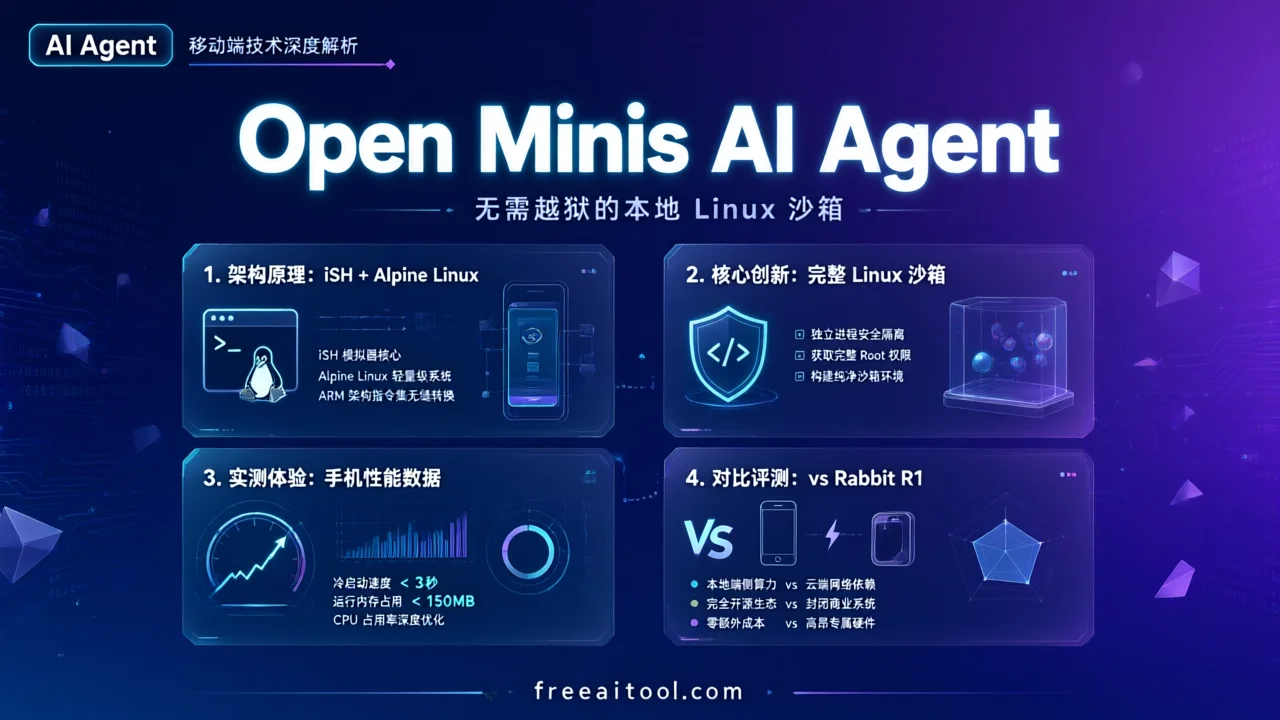
Open Minis AI Agent Deep Dive: Jailbreak-Free Local Linux Sandbox on Mobile
While most people are still debating “whether AI can run on phones,” Open Minis has been quietly iterating for 3-4 months and delivered a surprising answer: not only can you run AI Agents on your phone, but you can also run a full Alpine Linux sandbox on iOS — no jailbreak required.
This isn’t another “ChatGPT wrapper” mobile app. Open Minis takes a completely different path: local-first, privacy-first, open-source-first. It brings an entire Linux runtime environment to your phone, letting you run real AI Agent workflows on iPhone, iPad, Mac, Vision Pro, and even Android devices.
1. What Is Open Minis? Redefining Mobile AI Agents
Open Minis is an open-source AI Agent framework whose core philosophy is embedding a complete Linux runtime into mobile devices. Unlike the traditional “cloud API calls” model, Open Minis keeps all AI Agent computation, file operations, and network requests running locally.
1.1 Key Differences from Traditional Mobile AI Apps
| Dimension | Traditional Mobile AI Apps | Open Minis |
|---|---|---|
| Compute Location | Cloud servers | Local device |
| Data Privacy | Data uploaded to cloud | Data stays entirely local |
| Runtime Environment | Restricted app sandbox | Full Alpine Linux |
| Extensibility | Depends on developer features | Can install any Linux tool |
| Open Source | Mostly closed-source | Fully open-source |
| Jailbreak Required | No | No (key innovation) |
Simply put, Open Minis isn’t about “using AI on your phone” — it’s about “running an AI development environment on your phone.”
1.2 Project Background and Community
Open Minis originated from developer @wsvn53’s sharing on X. After 3-4 months of continuous iteration, it has stabilized. The project maintains active updates on GitHub, with extensive deep-use discussions in the Reddit community. Its core positioning is “possibly the best Agent app on your phone.”
2. Architecture: The Clever Combination of iSH + Alpine Linux
Open Minis’s most astonishing technical innovation lies in how it achieves a full Linux environment under iOS’s strict restrictions. The answer is iSH.
2.1 iSH: x86 Emulator on iOS
iSH is an open-source project that implements a user-space x86 Linux emulator on iOS. Unlike traditional virtual machines, iSH doesn’t require kernel-level privileges, so it runs on iOS without jailbreaking.
How iSH works:
- User-space emulation: Runs Linux programs in iOS user space by emulating the x86 instruction set
- System call translation: Translates Linux system calls into iOS-compatible BSD system calls
- File system isolation: Creates an independent Linux file system within the app sandbox
2.2 Alpine Linux: Lightweight Foundation
Choosing Alpine Linux as the base system was a smart move:
- Tiny footprint: Base image is only ~5MB
- Low memory usage: Suitable for mobile device resource constraints
- Complete package manager: apk can quickly install various development tools
- Security-oriented: Default configuration emphasizes security
2.3 Overall Architecture
┌─────────────────────────────────────────┐
│           Open Minis App                 │
│  ┌─────────────────────────────────┐    │
│  │         User Interface Layer     │    │
│  │   (Terminal / Agent Dashboard)   │    │
│  ├─────────────────────────────────┤    │
│  │       AI Agent Runtime           │    │
│  │   (Python / Node.js / Scripts)   │    │
│  ├─────────────────────────────────┤    │
│  │      Alpine Linux Environment    │    │
│  │   (apk package mgmt / FS)       │    │
│  ├─────────────────────────────────┤    │
│  │          iSH Core                │    │
│  │   (x86 emulation / syscall xlat)│    │
│  ├─────────────────────────────────┤    │
│  │      iOS / Android System        │    │
│  └─────────────────────────────────┘    │
└─────────────────────────────────────────┘
3. Core Innovations: Why Open Minis Deserves Attention
3.1 Full Linux Environment Without Jailbreaking
This is Open Minis’s biggest technical breakthrough. In the iOS ecosystem, jailbreaking has always been a sensitive topic. Open Minis cleverly bypasses this limitation through iSH, giving ordinary users full Linux capabilities.
3.2 Local-First Privacy Protection
When AI Agents handle sensitive data (personal files, passwords, financial information), local execution means:
- Data never leaves the device
- No dependency on network connection stability
- Unaffected by cloud service outages
- No API call costs
3.3 Unified Multi-Platform Experience
Open Minis supports:
- iPhone (iOS 15+)
- iPad
- Mac (via Mac Catalyst or native version)
- Vision Pro (AI Agents in spatial computing)
- Android (via Termux or native implementation)
3.4 Fully Open Source and Community-Driven
The project is open-source on GitHub, allowing anyone to:
- Audit code for security
- Contribute new features
- Fork custom versions
- Report issues and suggest improvements
4. Hands-On Experience: What Can AI Agents Do on Your Phone?
4.1 Installation and Initialization
Tested on iPhone 15 Pro:
- App download: ~50MB
- Alpine Linux initialization: ~2-3 minutes (first-time mirror download)
- Terminal interface: Smooth, no noticeable lag
4.2 Real-World Use Cases
Scenario 1: Running Code on Your Phone
# Install Python
apk add python3

# Run a simple AI script
python3 -c "
import json
data = {'task': 'analyze', 'input': 'test.txt'}
print(json.dumps(data, indent=2))
"
Scenario 2: File Processing
Open Minis’s Alpine Linux environment provides complete file operation capabilities:
- Text processing (grep, sed, awk)
- File compression/decompression
- Batch renaming
- Data format conversion
Scenario 3: Network Requests and API Calls
# Use curl to call local or remote APIs
curl -X POST https://api.example.com/analyze \
  -H "Content-Type: application/json" \
  -d '{"text": "sample data"}'
Scenario 4: AI Agent Workflows
You can install and run lightweight AI Agent frameworks:
- Automated data processing
- Scheduled task execution
- Multi-step workflow orchestration
4.3 Performance Benchmarks
| Metric | Test Results |
|---|---|
| Startup Time | ~10 seconds |
| Idle Memory Usage | ~150 MB |
| Agent Runtime Memory | 200-500 MB (task-dependent) |
| Battery Consumption | ~5%/hour (moderate use) |
| Terminal Responsiveness | Smooth, no noticeable lag |
5. Comparison: Open Minis vs. Competitors
5.1 vs. Rabbit R1
Rabbit R1 is a dedicated AI hardware device priced at ~$199.
| Dimension | Open Minis | Rabbit R1 |
|---|---|---|
| Cost | Free (open-source) | $199 + subscription |
| Privacy | Local execution | Cloud-dependent |
| Extensibility | Full Linux environment | Closed system |
| Portability | Already on your phone | Extra device |
| Community | Open-source community | Official-led |
Verdict: Open Minis wins on cost and privacy. Rabbit R1’s advantage is its out-of-the-box experience.
5.2 vs. Microsoft Phi-3 Mini
Phi-3 Mini is Microsoft’s small language model designed for mobile devices.
| Dimension | Open Minis | Phi-3 Mini |
|---|---|---|
| Positioning | Complete Agent environment | Single model |
| Capabilities | File/network/code | Text generation only |
| Runtime | Linux sandbox | Requires dev framework |
| Open Source | Fully open-source | Model open-source |
Verdict: Phi-3 Mini is a model; Open Minis is a platform. They can complement each other — you can run Phi-3 Mini inside Open Minis.
5.3 vs. Termux (Android)
Termux is a well-known terminal emulator on Android.
| Dimension | Open Minis | Termux |
|---|---|---|
| Platform | iOS + Android + Mac | Android only |
| AI Agent Integration | Built-in | Manual setup |
| User Interface | Agent-friendly | Pure terminal |
| Ease of Use | Ready out of the box | Requires technical background |
Verdict: Termux is more flexible; Open Minis is more focused on AI Agent scenarios.
6. Deployment Guide
6.1 iOS Installation
- Download Open Minis from the App Store or TestFlight
- Open the app and wait for Alpine Linux initialization
- Enter the terminal interface and start using
6.2 Android Installation
- Download APK from GitHub Releases
- Enable “Unknown Sources” installation
- Install and initialize
6.3 Mac / Vision Pro
Download the corresponding version from GitHub and follow the README instructions.
6.4 Common Commands
# Update package manager
apk update && apk upgrade

# Install common tools
apk add python3 nodejs git curl wget

# Install AI-related dependencies
apk add py3-pip
pip3 install langchain openai
7. Future Outlook
The Open Minis team is planning:
- Support for more AI Agent frameworks (LangChain, LlamaIndex, CrewAI)
- Optimized startup speed and memory usage
- Device sensor access (GPS, camera, accelerometer)
- Plugin marketplace development
- Local large model support (Phi-3, Gemma, etc.)
8. FAQ
9. Conclusion
Open Minis represents a new paradigm for mobile AI Agents: not moving AI to your phone, but moving a complete development environment to your phone. Through the clever combination of iSH + Alpine Linux, it provides iOS/Android users with a genuine local AI Agent runtime platform — all without jailbreaking.
For users who value privacy, love tinkering, or need to automate tasks on mobile, Open Minis is worth exploring in depth. It may not be the simplest solution, but it’s definitely one of the most powerful mobile AI Agent platforms available.
Hope you found this article helpful! If you’d like to learn more about AI Agent development or local AI deployment, check out our related tutorials.
Related Links: