title: '5 Best Free AI Coding Tools to Try in 2026' date: 2026-04-03 authors: [kevinpeng] slug: best-free-ai-coding-tools-2026 categories: - AI Assistants tags: - AI Coding - Free Tools - Developer Tools - GitHub Copilot - Cursor description: Complete comparison of the best free AI coding tools in 2026: GitHub Copilot Free, Cursor Free, Codeium, Tabby, and Continue. Detailed feature analysis, installation guides, and practical usage recommendations. cover: https://res.makeronsite.com/freeaitool.com/best-free-ai-coding-tools-2026-cover.webp lang: en
5 Best Free AI Coding Tools to Try in 2026
Why Do You Need Free AI Coding Tools?
In 2026, AI coding assistants have become a standard for developers. But with so many paid options available, many developers (especially students, open source contributors, and independent developers) are asking: What truly free and effective AI coding tools are available?
This article covers the 5 best free AI coding tools worth trying in 2026, including their core features, limitations, and use cases.
1. GitHub Copilot Free - The Official Free Tier
GitHub Copilot Free is GitHub's free tier launched in 2026, providing enough daily usage for individual developers.
Core Features
- ✅ 2,000 code completions per month
- ✅ 50 AI chat conversations per month
- ✅ Supports VS Code, JetBrains, Neovim, and other mainstream editors
- ✅ Multi-language support (Python, JavaScript, TypeScript, Go, etc.)
Installation
# Search for "GitHub Copilot" in VS Code Extensions
# Or install via command line
code --install-extension github.copilot
Limitations
- Must wait for monthly refresh after completions are used up
- Slower response for chat (free users have lower priority)
- No enterprise features (like custom model fine-tuning)
Who It's For
Individual developers, students, open source project contributors
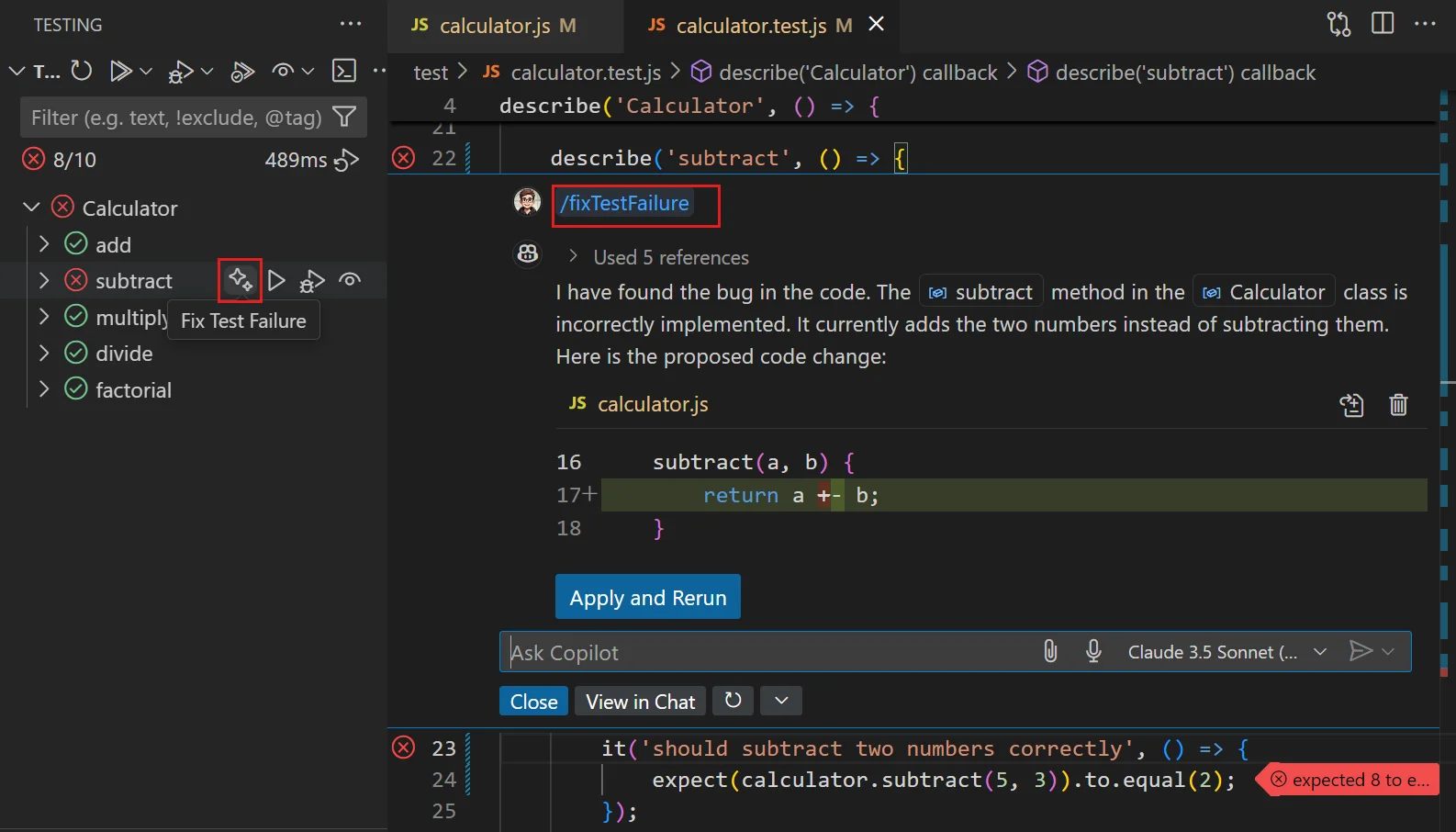 GitHub Copilot official interface in VS Code (Source: Microsoft)
Official website: https://github.com/features/copilot
2. Cursor Free - The Most Powerful Free Option
Cursor is an AI-powered code editor whose free tier remains one of the most competitive choices in 2026.
Core Features
- ✅ 2,000 fast completions per month
- ✅ Unlimited slow completions (using smaller models)
- ✅ Built-in AI chat and code generation
- ✅ Codebase context understanding (RAG)
- ✅ One-click AI refactoring and debugging
Installation
# macOS
brew install --cask cursor

# Windows
winget install Cursor.Cursor

# Linux
curl -L https://cursor.sh/install.sh | sh
Unique Advantages
Cursor's biggest highlight is its deep AI integration into the editor core, not just as a plugin. This means:
- AI can understand the entire project context
- Supports cross-file code generation and modification
- Built-in terminal AI commands (Cmd+K to generate commands directly)
Limitations
- Switches to slow mode after fast completions are used up
- Advanced features (team sharing, custom models) require payment
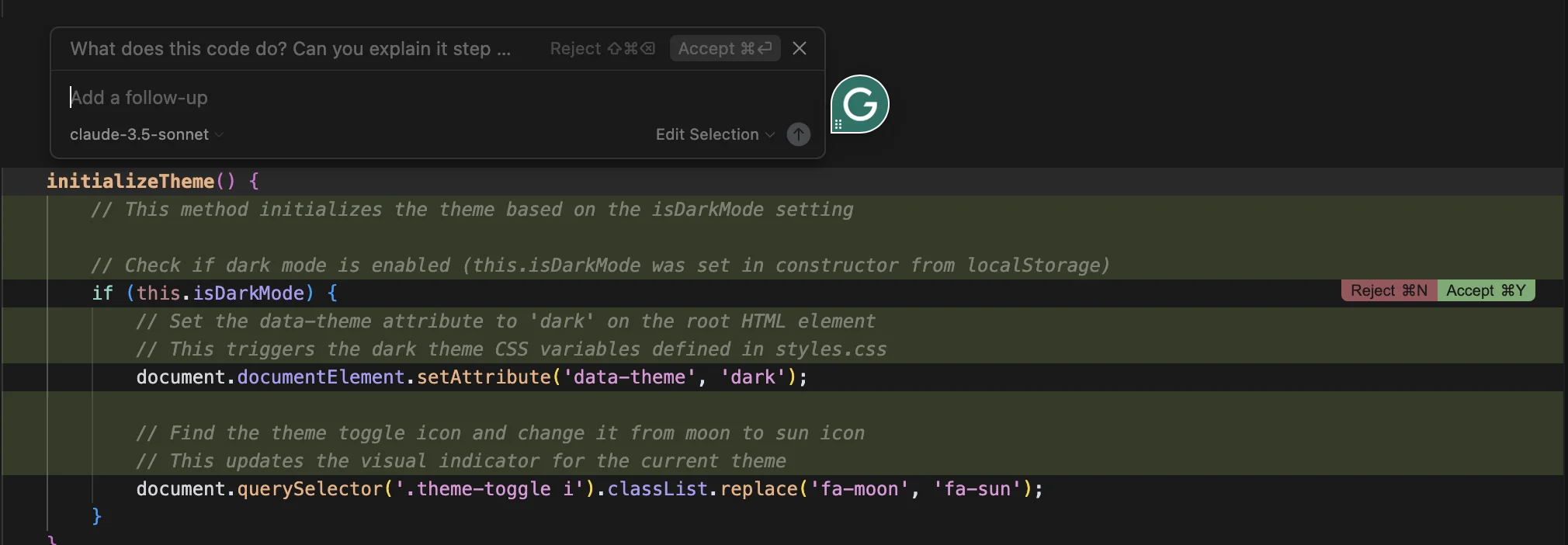 Cursor AI editor interface (Source: Codecademy tutorial)
Official website: https://cursor.com
3. Codeium - Completely Free Commercial-Grade Tool
Codeium is one of the few commercial AI coding tools that offers a "forever free" personal tier.
Core Features
- ✅ Unlimited code completions
- ✅ Unlimited AI chat
- ✅ Supports 70+ programming languages
- ✅ Enterprise-grade security (code not used for training)
- ✅ Self-hosting option
Installation
# VS Code
code --install-extension codeium.codeium

# JetBrains
# Search for "Codeium" in the plugin marketplace
Unique Advantages
Codeium's business model monetizes through enterprise versions, so personal users can use all core features completely free without usage limits.
Limitations
- Free users cannot access advanced analytics
- Self-hosting requires deploying your own server
💡 Interface Preview: Visit the VS Code marketplace page to see Codeium in action.
Official website: https://codeium.com
4. Tabby - Open Source Self-Hosted Solution
Tabby is a fully open source, self-hostable AI coding assistant suitable for teams with strict data privacy requirements.
Core Features
- ✅ Completely open source (Apache 2.0 license)
- ✅ Supports local deployment
- ✅ Multiple open source model support (CodeLlama, StarCoder, etc.)
- ✅ No data leakage risk
- ✅ Docker one-click deployment
Installation
# Docker deployment
docker run -it --rm \
  -p 8080:8080 \
  -v $HOME/.tabby:/data \
  tabbyml/tabby serve --model StarCoder-1B

# VS Code extension
code --install-extension tabbyml.tabby
Configuration Example
# config.toml
[model]
name = "StarCoder-3B"

[server]
port = 8080
host = "0.0.0.0"
Who It's For
- Teams with strict code privacy requirements
- Developers who want to customize models
- Users with local GPU resources
 Tabby self-hosted AI coding assistant demo (Source: GitHub TabbyML/tabby)
GitHub: https://github.com/TabbyML/tabby
5. Continue - Open Source VS Code Extension
Continue is an open source VS Code extension that allows you to use any LLM as a coding assistant.
Core Features
- ✅ Completely open source (Apache 2.0)
- ✅ Supports any LLM (local or cloud)
- ✅ Configurable prompt templates
- ✅ Supports code selection, editing, explanation
- ✅ Built-in chat interface
Installation
# VS Code
code --install-extension continue.continue
Configuration File
// .continue/config.json
{
  "models": [
    {
      "title": "Ollama",
      "provider": "ollama",
      "model": "codellama:7b"
    },
    {
      "title": "Claude",
      "provider": "anthropic",
      "model": "claude-sonnet-4-2026"
    }
  ],
  "tabAutocompleteModel": {
    "title": "Ollama",
    "provider": "ollama",
    "model": "starcoder2:3b"
  }
}
Unique Advantages
Continue's biggest advantage is flexibility — you can freely switch between different model providers and even use multiple models simultaneously.
 Continue VS Code extension official interface (Source: GitHub continuedev/continue)
GitHub: https://github.com/continuedev/continue
Tool Comparison Summary
| Tool | Completion Limits | Chat Limits | Self-Host | Open Source |
|---|---|---|---|---|
| GitHub Copilot Free | 2,000/month | 50/month | ❌ | ❌ |
| Cursor Free | 2,000/month | Unlimited slow | ❌ | ❌ |
| Codeium | Unlimited | Unlimited | ✅ | ❌ |
| Tabby | Depends on hardware | Depends on hardware | ✅ | ✅ |
| Continue | Depends on model | Depends on model | ✅ | ✅ |
Selection Recommendations
🎯 Beginners/Students
Recommended: GitHub Copilot Free or Cursor Free - Official support, well-documented - Sufficient free tier for learning needs
🚀 Professional Developers
Recommended: Cursor Free + Codeium combination - Cursor for daily coding - Codeium as backup (unlimited usage)
🔒 Privacy-Sensitive Teams
Recommended: Tabby or Continue + local models - Code processed entirely locally - Customizable models and security policies
💰 Budget-Conscious
Recommended: Codeium - Completely free, no usage limits - Features close to paid tools
Conclusion
Free AI coding tools in 2026 are powerful enough to meet most developers' daily needs. Which tool to choose depends on your specific scenario:
- Best experience → Cursor
- Unlimited usage → Codeium
- Privacy focus → Tabby
- Tinkering → Continue
We recommend trying 2-3 tools to find the best fit for your workflow. Remember, tools are just a means — improving coding efficiency is the goal.
Related reading: - Cursor Best Practices Guide - Dify AI Platform Complete Guide - Top Open Source AI Projects 2026